
HTML vs CSS is the first fork every web beginner hits, and the short answer fits on one line: HTML is what’s on the page, CSS is how it looks. The trouble is that “content versus presentation” sounds abstract until you watch it happen, and plenty of explanations stop at a code block and ask you to imagine the result.
So I ran the test instead of describing it. I wrote one 43-line HTML file for a made-up coffee roaster and rendered it in Chrome three times: with no stylesheet, with a light stylesheet, and with a dark editorial one. The HTML stayed byte-for-byte identical across all three. Then I broke the page from the HTML side, and measured how much HTML and CSS six well-known homepages actually ship.
What Is the Difference Between HTML and CSS?
HTML and CSS are the two languages that build web pages. HTML (HyperText Markup Language) defines what’s on the page and what each piece is: a heading, a paragraph, a link, a navigation menu. CSS (Cascading Style Sheets) defines how those pieces look: colors, fonts, spacing, and where everything sits.
MDN’s HTML reference calls HTML “the most basic building block of the Web,” the layer that “defines the meaning and structure of web content.” Its CSS reference describes CSS as a stylesheet language for describing “the presentation of a document written in HTML or XML.”
| HTML | CSS | |
|---|---|---|
| Full name | HyperText Markup Language | Cascading Style Sheets |
| Job | Content and structure | Appearance and layout |
| Kind of language | Markup language | Stylesheet language |
| What the code looks like | <h1>Fresh coffee</h1> | h1 { color: #7c4a1e; } |
| Where it lives | .html files | .css files, a <style> block, or a style attribute |
| If you delete it | There’s no page | The page still works, in browser default styles |
| Who maintains the standard | WHATWG | W3C CSS Working Group |
HTML vs CSS in Practice: One HTML File, Three Stylesheets
The test page is a homepage for Ridgeline Coffee, a roaster I invented for this. It has the parts most small sites have: a header with a logo and three nav links, a hero section with a headline and a button, three feature blurbs, and a footer. Here’s the body, built from the same semantic layout elements a real page would use:
<header class="site-header">
  <a class="logo" href="/">Ridgeline Coffee</a>
  <nav>
    <a href="/shop">Shop</a>
    <a href="/subscriptions">Subscriptions</a>
    <a href="/visit">Visit</a>
  </nav>
</header>
<main>
  <section class="hero">
    <h1>Small-batch coffee, roasted every Tuesday</h1>
    <p>We roast in small batches and ship within two days, so the bag you open is never more than a week old.</p>
    <a class="button" href="/shop">Shop the beans</a>
  </section>
  <section class="features">
    <article>
      <h2>Single origin</h2>
      <p>Every bag names the farm, the altitude, and the harvest month.</p>
    </article>
    <!-- two more articles: "Roasted to order" and "Easy swaps" -->
  </section>
</main>
<footer>
  <p>Ridgeline Coffee · Portland, Oregon</p>
</footer>
The <head> links a single file, style.css. For each render I served that exact HTML file to headless Chrome and changed only what came back for style.css: nothing, then a light stylesheet, then a dark editorial one. I hashed the HTML before each render and got the same SHA-256 every time, so not one character changed.
Render 1: No CSS at All
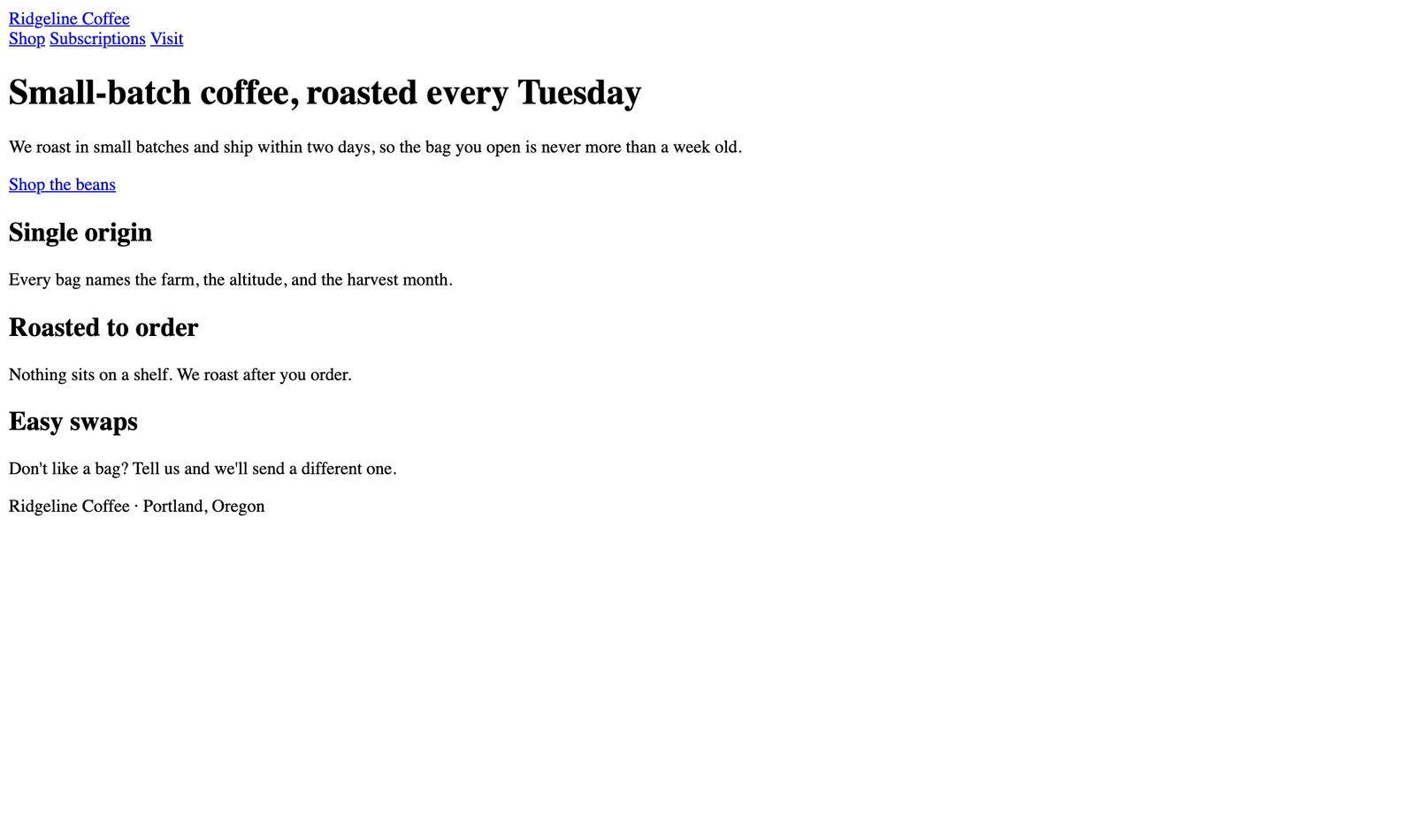 The test page with an empty stylesheet. Only Chrome’s default styles apply, and every word is already here.
This is HTML on its own, and nothing is missing. The headline is big and bold because the browser ships a built-in stylesheet that sizes <h1> up, makes links blue and underlined, and puts space between paragraphs. MDN calls these user-agent stylesheets: “basic stylesheets that give default styles to any document.” Everything stacks top to bottom in source order, because that’s the default flow.
Render 2: A Light Stylesheet
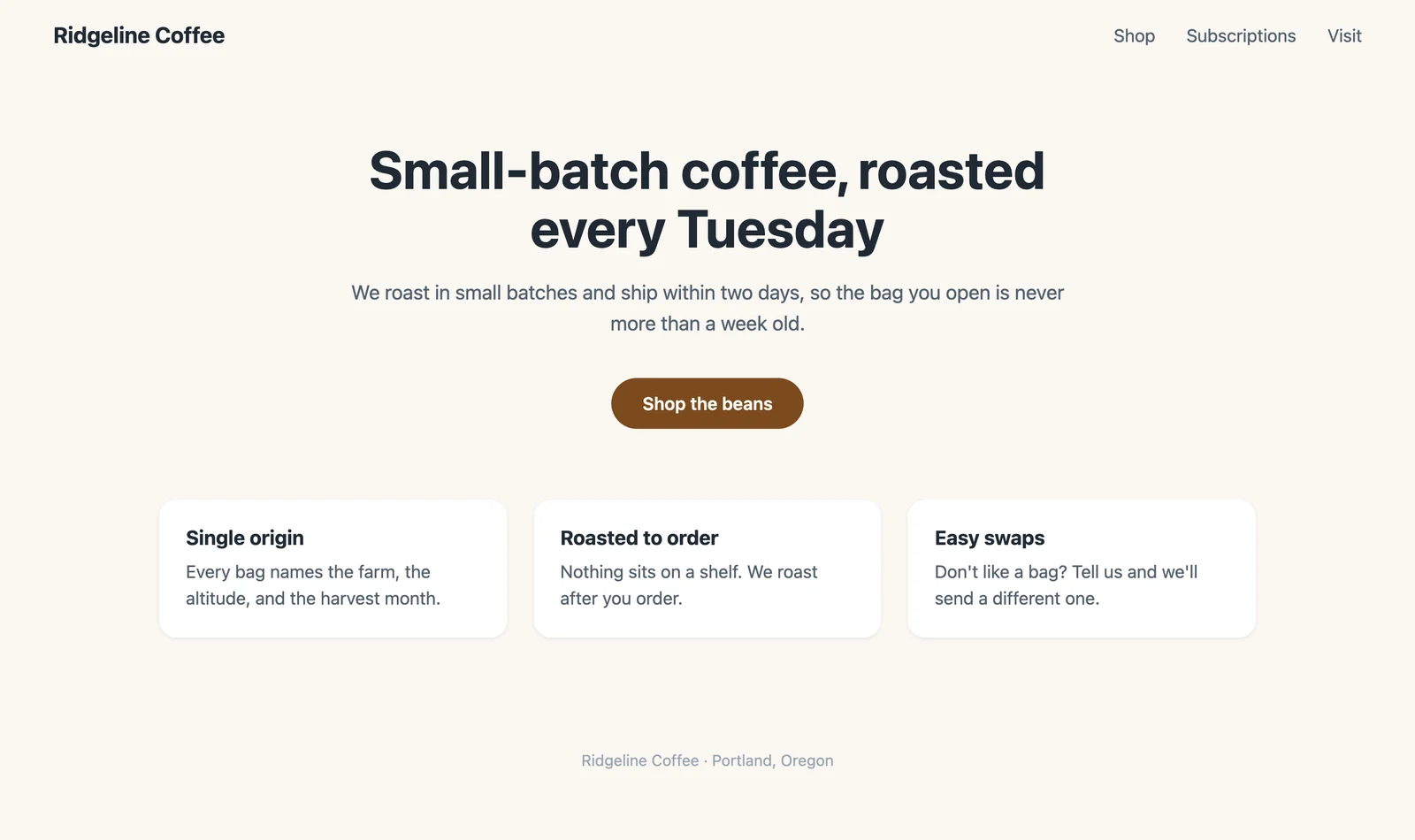 Same HTML with light.css applied: 14 rules, 53 declarations.
Fourteen rules turned the stack into a designed page. A flex row puts the logo and nav on one line, the hero gets centered with a max width, and the three blurbs become cards in a row. These three declarations are the entire card grid:
.features {
  display: grid;
  grid-template-columns: repeat(3, 1fr);
  gap: 24px;
  /* … plus max-width, margin, and padding */
}
Render 3: A Dark Editorial Stylesheet
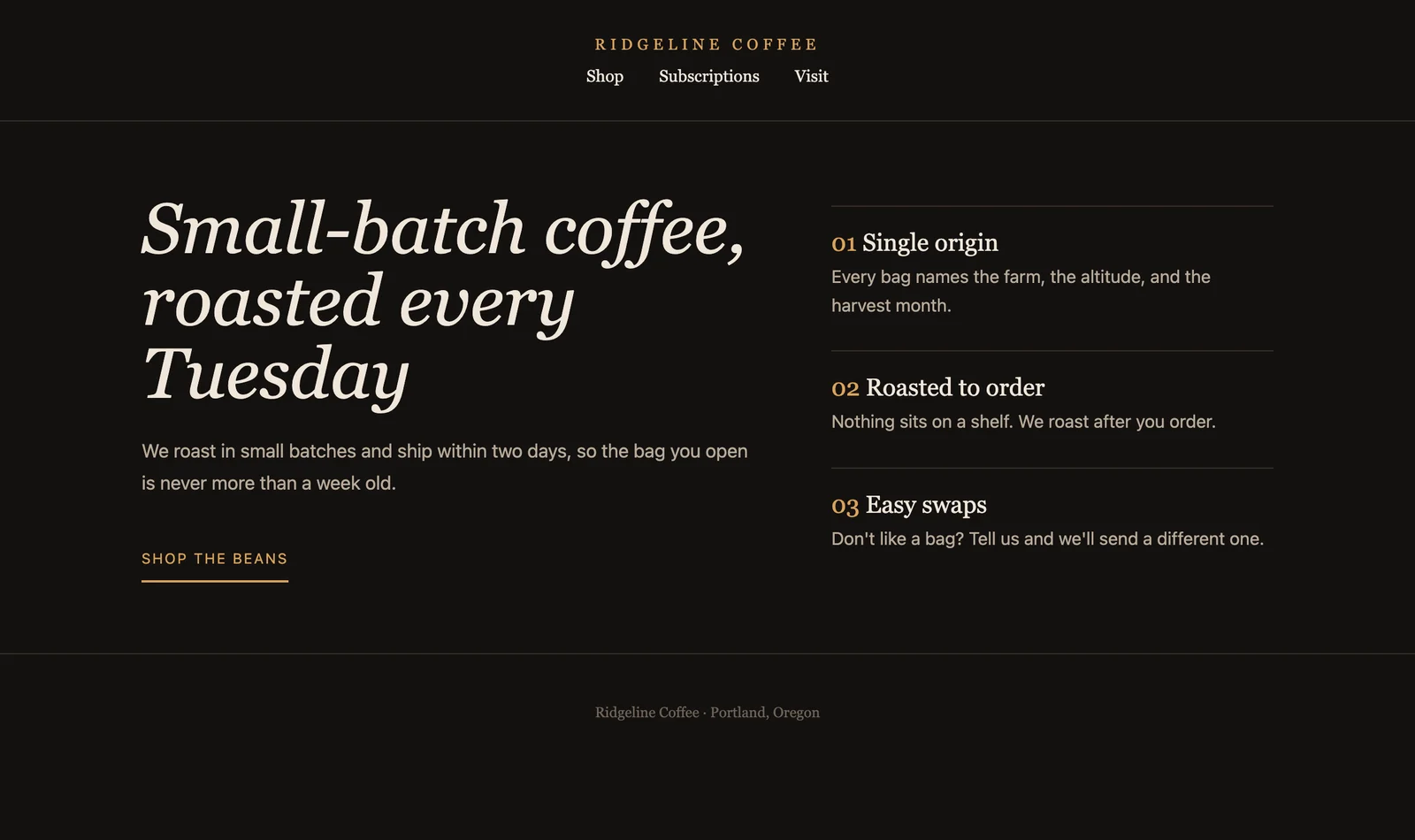 Same HTML again with editorial.css: 16 rules, 68 declarations. The feature list now sits beside the hero.
This one changes more than colors. The nav drops under a centered, letter-spaced logo, the headline becomes an italic serif, and the feature list moves from below the hero to beside it. That last move came from two declarations on <main>:
main {
  display: grid;
  grid-template-columns: 1.4fr 1fr;
  /* … plus gap, max-width, margin, and padding */
}
The gold “01, 02, 03” labels aren’t in the HTML either. CSS generated them with a counter and a ::before pseudo-element. (If you’re choosing between grid and flexbox for jobs like these, I tested both on nine layout patterns.)
| Render | HTML lines | CSS rules | CSS declarations | Text characters in the HTML |
|---|---|---|---|---|
| No stylesheet | 43 | 0 | 0 | 451 |
| Light | 43 | 14 | 53 | 451 |
| Editorial | 43 | 16 | 68 | 451 |
All three renders contain the same 451 characters of HTML text, and the only new characters on screen, the editorial numbers, came from CSS. Every design decision lived in the stylesheet. Designers have been proving this since 2003 on the CSS Zen Garden, where each entry restyles one shared HTML file. As the site puts it: “The HTML remains the same, the only thing that has changed is the external CSS file.”
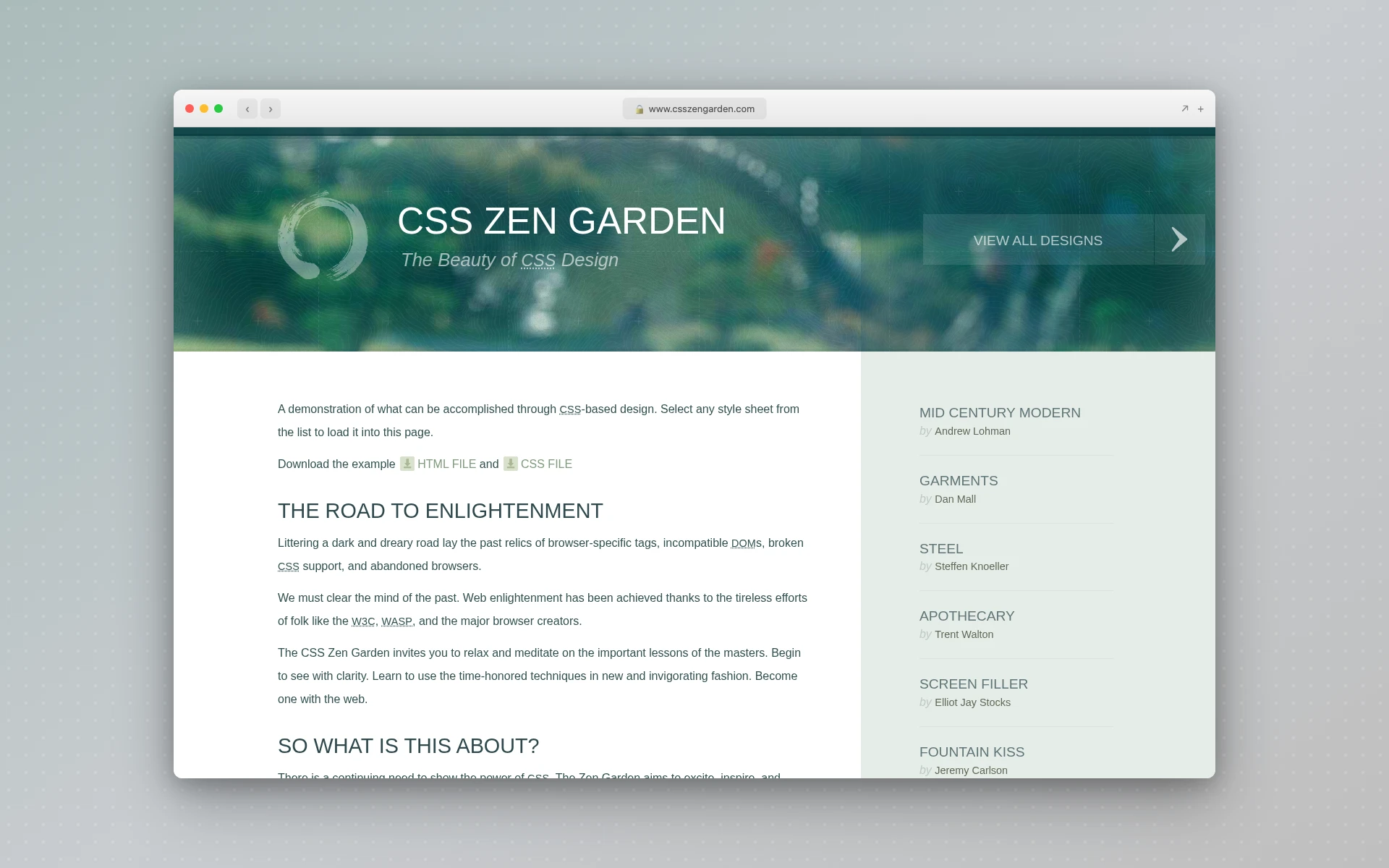 CSS Zen Garden, Dave Shea’s long-running demo of one HTML file wearing many stylesheets.
Then I Changed the HTML Instead
Breaking the page from the other side shows how the two languages connect. I kept light.css exactly as it was and changed one attribute in the HTML: class="features" became class="perks".
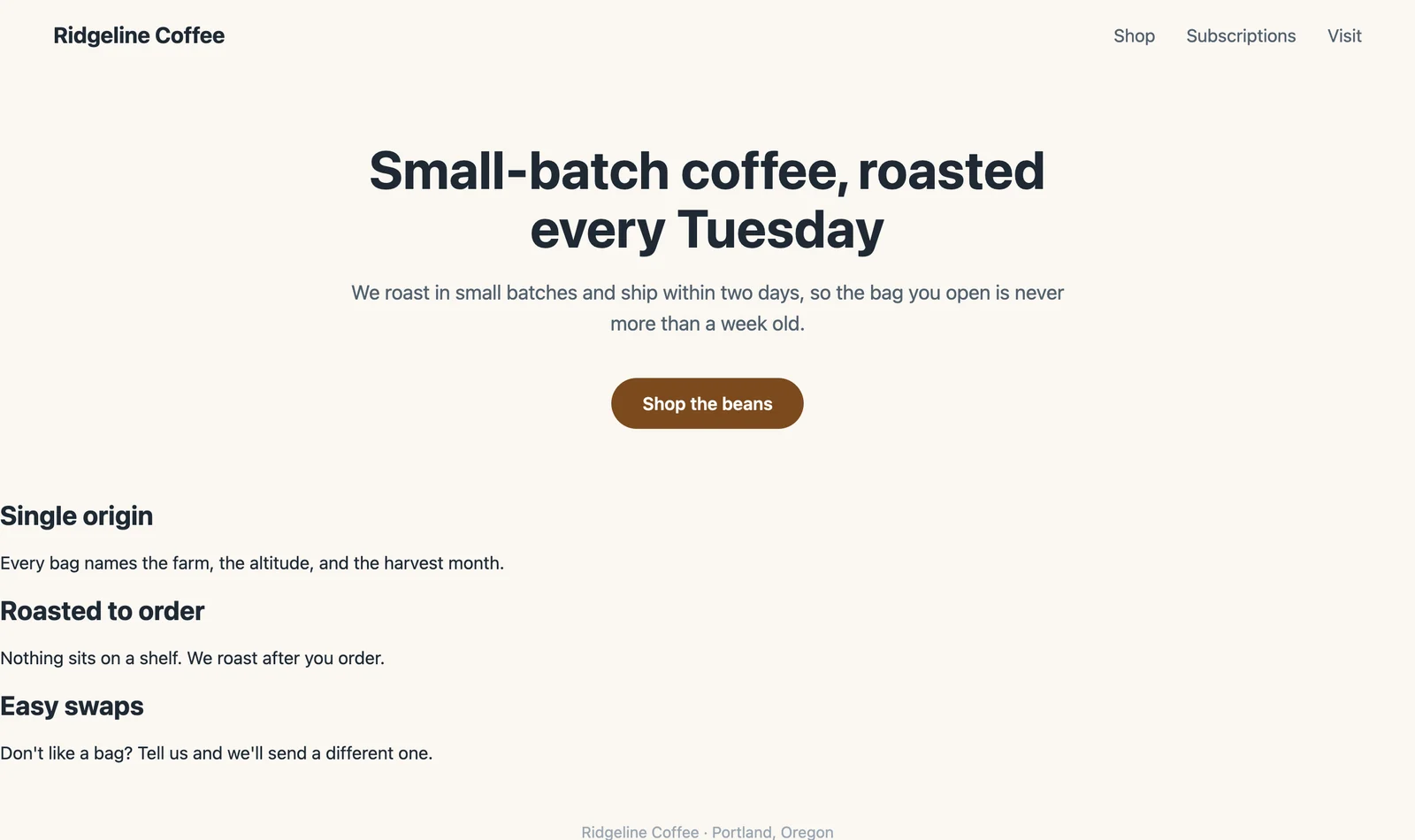 One renamed class. The header and hero kept their styles. The cards lost theirs.
Four of light.css’s 14 rules started with .features, so all four stopped matching anything, and 15 of the 53 declarations went dead in one edit. With them went the card grid, the white backgrounds, the padding, and the shadows, leaving the blurbs as a plain stack against the left edge. Header and hero stayed intact, since their rules target other classes.
CSS reaches into HTML through selectors (an element name, a class, an ID), so CSS depends on HTML, while HTML doesn’t depend on CSS at all. Rename a class and every rule pointing at the old name quietly stops working, with no error message, just a broken layout.
How Much CSS Do Real Websites Ship?
Real websites often ship more CSS than HTML. I loaded six well-known homepages in headless Chrome at a 1440px desktop viewport on October 29, 2026, and measured the HTML document against every stylesheet it loaded, uncompressed. CSS outweighed HTML on three of the six: GitHub, GOV.UK, and Apple. Hacker News loads a single 7.2 KB stylesheet.
| Site | HTML | CSS | Stylesheet files | CSS size vs HTML |
|---|---|---|---|---|
| GitHub | 518 KB | 2,557 KB | 25 | 4.9× |
| GOV.UK | 84 KB | 398 KB | 2 | 4.8× |
| Apple | 253 KB | 853 KB | 11 | 3.4× |
| Stripe | 650 KB | 535 KB | 4 | 0.8× |
| MDN | 118 KB | 54 KB | 20 | 0.5× |
| Hacker News | 34 KB | 7 KB | 1 | 0.2× |
A few caveats so the table doesn’t mislead. These are uncompressed sizes, the amount the browser actually parses. CSS compresses well in transit, so GitHub’s 2,557 KB arrived as 308 KB and GOV.UK’s 398 KB as under 44 KB.
Homepages also change daily, so your numbers will drift; my two runs landed within 2% of each other. I left Wikipedia out because its software injects much of the CSS with JavaScript, which blurs the line between the two.
The ratio tracks the kind of page more than its quality. GitHub and Apple ship heavily designed marketing pages, while Hacker News is a plain list of links.
What These Pages Look Like With CSS Turned Off
Turning CSS off is the quickest way to see the HTML underneath any site. On each homepage I disabled every stylesheet and stripped the inline style attributes.
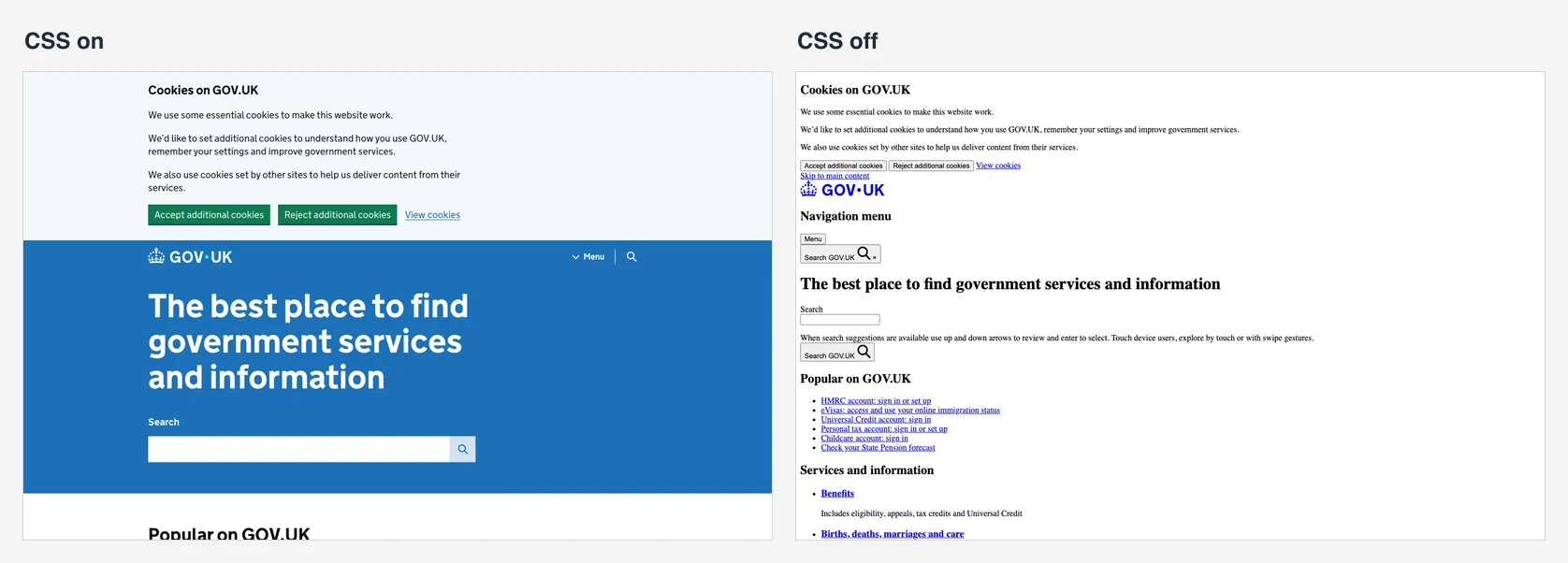 GOV.UK with CSS (left) and without it (right). Same content, same order.
GOV.UK holds up: cookie banner, logo, the main heading, search, then the popular links as a plain bulleted list. It still reads in a sensible order because the order comes from the HTML, not the stylesheet.
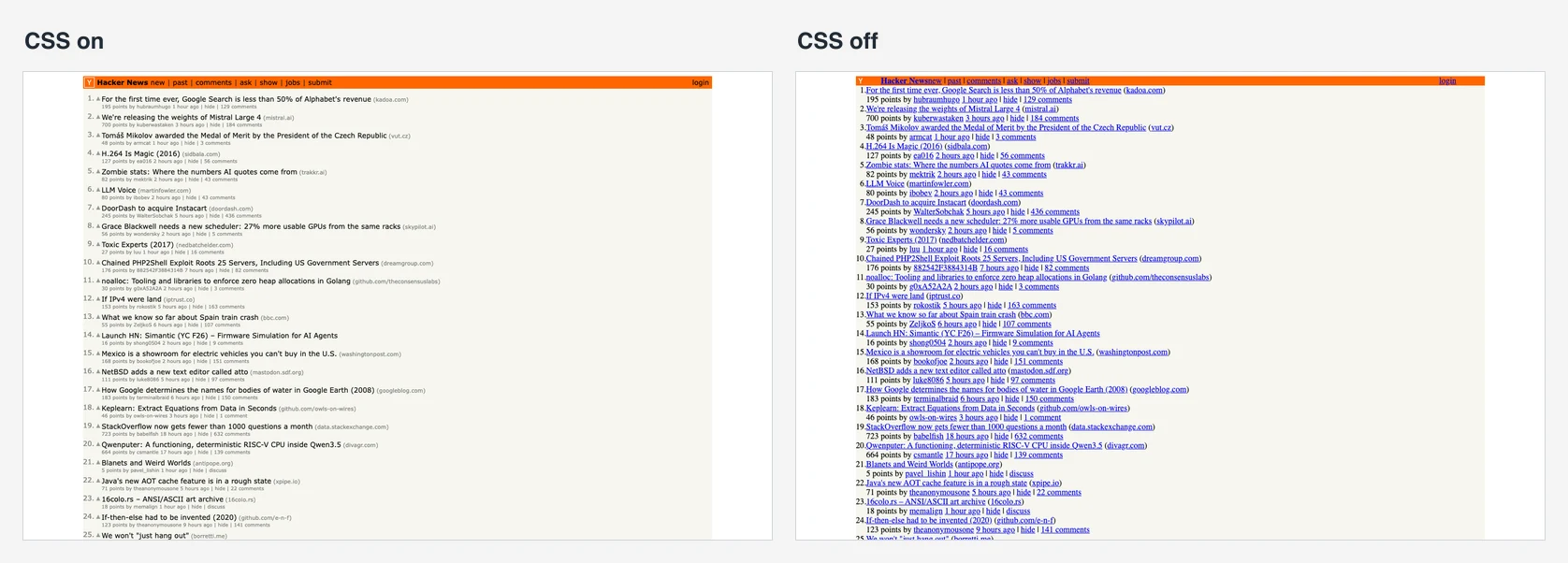 Hacker News with CSS (left) and without it (right). The orange bar survives.
Hacker News is the odd one. Its orange header and beige background stay put with CSS disabled, because they aren’t CSS. Its HTML still sets them with bgcolor attributes (bgcolor="#ff6600" on the header), arranges the list with tables, and uses 33 <center> tags. That’s how pages were styled before browsers supported CSS, and the HTML standard now lists bgcolor, <center>, and <font> as obsolete features that “must not be used by authors.” Chrome still renders them.
Apple’s homepage was the strangest. With CSS off, it opens on the full Store menu, every link that CSS normally tucks into a flyout. HTML holds all of it, and CSS decides what you see and when.
Why Are HTML and CSS Separate Languages?
Keeping structure and styling apart was the plan from the start. The W3C’s history of CSS says separating a document’s structure from its layout “had been a goal of HTML from its inception in 1990.” Håkon Wium Lie published the first CSS proposal in October 1994, and CSS level 1 became a W3C Recommendation in December 1996.
The split is what made the Ridgeline test possible, and it pays off on real sites. One stylesheet can restyle every page at once. A redesign doesn’t mean rewriting content, and the content stays readable when a stylesheet fails to load.
How Do HTML and CSS Work Together?
HTML and CSS connect through selectors. The HTML labels elements with tags, classes, and IDs, and each CSS rule picks elements by those labels and sets properties on them. When several rules target the same element, a set of priority rules called the cascade decides which one wins.
There are three ways to attach CSS to a page:
<!-- 1. External stylesheet: one file, shared by every page -->
<link rel="stylesheet" href="style.css">

<!-- 2. A <style> block inside the page -->
<style>
  h1 { color: #7c4a1e; }
</style>

<!-- 3. An inline style attribute on one element -->
<h1 style="color: #7c4a1e;">Small-batch coffee</h1>
Use the external file for almost everything. It’s the only option of the three that lets every page on a site share one set of rules, and it’s what made the three-look test work: swapping one file restyled the whole page. Inline styles are the hardest to override and the easiest to forget, which is why the CSS-off test had to strip them separately.
The “cascading” part matters once a site grows. Your rules stack on top of the browser defaults from render 1, and MDN defines the cascade as “an algorithm that defines how user agents combine property values originating from different sources.” In practice, a more specific selector beats a general one, and when two rules tie, the later one wins. Media queries, rules that apply only at certain screen widths, are CSS too, which is why making a layout responsive is mostly stylesheet work. These responsive website templates are a good place to read that CSS in action.
What’s the Difference Between HTML, CSS, and JavaScript?
HTML, CSS, and JavaScript are the three layers of a web page. HTML is the structure, CSS is the presentation, and JavaScript is the behavior. A “Buy” button shows the split: HTML creates the button, CSS makes it brown and rounded, and JavaScript adds the item to your cart when you click it.
| Layer | Language | Question it answers | On the Ridgeline page |
|---|---|---|---|
| Structure | HTML | What is this? | <a class="button">Shop the beans</a> |
| Presentation | CSS | How does it look? | A brown pill with white text |
| Behavior | JavaScript | What does it do? | Nothing needed |
MDN draws the same line, noting that besides HTML, “other technologies” describe “a web page’s appearance/presentation (CSS) or functionality/behavior (JavaScript).” The Ridgeline page used no JavaScript at all and nothing about it was broken. Plenty of pages, like articles and simple landing pages, need little or none. JavaScript is also the only one of the three that’s a general-purpose programming language.
Should I Learn HTML or CSS First?
Learn HTML first, then CSS right after. CSS has nothing to style until there’s HTML on the page, and the renamed-class test shows why the order matters: every CSS rule points at something in the HTML. Knowing which elements exist and what they mean is what makes writing selectors straightforward.
The gap between the two is short in practice. Write a page in plain HTML first, the way you’d sketch a wireframe before the visual design, then style it.
Once selectors, the box model (content, padding, border, margin), and basic color and type make sense, move on to layout with flexbox and grid. Learning the semantic elements early helps twice. They give your CSS clean hooks, and they keep the page usable before any styling loads, like the GOV.UK screenshot above.
Is CSS Harder Than HTML?
For most people, yes. HTML has a fixed vocabulary of elements with clear meanings, and a mistake usually shows up right where you made it. CSS properties interact: a rule’s result depends on the cascade and on the layout its parent sets up, so a change in one place can move something somewhere else.
My test shows the gap in miniature. The HTML took 43 lines and never changed. Every choice that made the three renders look different (spacing, type, color, which blurb sat where) had to be written as CSS: 53 declarations in one stylesheet, 68 in the other.
Are HTML and CSS Outdated?
No. Web pages still render through HTML and CSS, and both keep changing. HTML is a “Living Standard” that the WHATWG updates continuously; the copy I checked was last updated on October 26, 2026. CSS adds features in modules, like the :has() selector, which can style a parent based on its children and has worked across browsers since December 2023.
What’s outdated is the old way of styling, with <font> tags and bgcolor attributes. AI coding tools haven’t replaced the two languages either. If you vibe code a website, the files the AI hands back are HTML and CSS (or framework code that compiles to them), usually with some JavaScript, so it helps to be able to read them.
Frequently Asked Questions
Can a website work with only HTML?
Yes. A page with no CSS still loads, its links still work, and the browser applies its own default styles: large bold headings, blue underlined links, and everything stacked in source order. It looks plain, but nothing is missing. Before CSS caught on, sites set colors with HTML attributes like bgcolor, which the HTML standard now lists as obsolete.
Can you use CSS without HTML?
Not on its own. CSS describes how a document should be presented, so it needs a document to style. That’s usually HTML, though MDN notes CSS also styles XML formats such as SVG, MathML, and XHTML. Open a CSS file by itself in a browser and you’ll just see its source code as text.
Is CSS a programming language?
Most developers don’t call it one, and MDN describes it as a stylesheet language. You declare what elements should look like, and the browser works out how to draw them. HTML is a markup language. Of the three core web languages, JavaScript is the general-purpose programming language, the one that handles logic and interactivity.
Is CSS just C++?
No, they’re unrelated languages that happen to share a first letter. C++ is a general-purpose programming language used to build software like games and web browsers. CSS is a stylesheet language that only describes how web documents look. Learning one won’t teach you the other.
What does cascading mean in Cascading Style Sheets?
It describes how CSS settles conflicts. Styles arrive from several sources: the browser’s defaults, the site’s stylesheets, and sometimes the user’s own settings. When two rules set the same property on the same element, the cascade picks a winner based on where each rule came from, how specific its selector is, and which one comes last.
The Short Version
HTML is what a page says and how it’s organized. CSS is how it looks. The Ridgeline test made that concrete: one unchanged HTML file produced three different pages, and renaming a single class in the HTML knocked out 15 of the stylesheet’s 53 declarations.
If you’re starting out, write the HTML first, style it second, and turn CSS off on sites you admire to see how they’re built. If you’d rather start from a generated page, AIDesigner turns a text prompt into a responsive HTML and CSS design. Its free tier includes 5 lifetime credits with no card required.